Most LinkedIn tools ask you to trust a company with your history. Everpost asks you to trust your own disk. That is the whole design, and this page describes it in enough detail that you can check it rather than take it on faith.
Where your data lives
Everpost writes to one SQLite file on your own machine.
- macOS:
~/Library/Application Support/Everpost/data/linkedin-os.db - Windows:
%APPDATA%\Everpost\data\linkedin-os.db
Settings, then Data, then Reveal folder opens it. Your posts, your drafts, your connections and your analytics history are rows in that file. There is no Everpost server for the app to send them to, and no account to create for the free tier. Copy the file to back it up. Delete the file and it is gone, with no second copy sitting on a server, because there is no server.
How Everpost touches LinkedIn
LinkedIn opens in a real Chromium window on your machine, on your own signed-in session and your own IP address. You sign in yourself, the normal way, on LinkedIn's own page. Everpost never asks for, sees, stores or transmits your password, and never copies the session cookies out of that window.
Everything the app does on LinkedIn is one of three things: open a page you asked for, read what is already rendered on screen, or import the data export LinkedIn generates when you ask it for a copy of your data. There is no browser extension, no background crawling, and nothing that replays LinkedIn's private requests behind your back.
What the LinkedIn window is allowed to do
That window is not a general purpose browser. It runs in its own isolated session inside the app, separate from everything else, and three rules apply to it.
- No camera, no microphone, no location. Every permission request from a page in that window is denied outright. Nothing in Everpost needs a device, so nothing gets one.
- Navigation is restricted to LinkedIn. The window stays on LinkedIn and the sign-in providers LinkedIn itself hands off to, such as Google or Apple when you use those to sign in. Click a news article in your feed and it opens in your normal browser instead, outside the window holding your session.
- Redirects are checked too. A link that starts on LinkedIn and redirects somewhere else is stopped at the redirect, not after it has loaded.
Those last two exist because the alternative is worse than it sounds: a page loaded in the window that holds your live LinkedIn session, with no address bar to warn you where you actually are.
You press post
Scheduling decides when a post surfaces, not who sends it. At the scheduled time, Everpost opens LinkedIn's own composer with your text already loaded, and waits. That costs one click per post. It also means there is no automated publishing path for LinkedIn to flag.
There is one other way to publish, and it is off until you set it up yourself. You can register your own app on LinkedIn's developer site, add LinkedIn's own posting product to it, and connect it in Settings. LinkedIn then shows you its own consent screen, and posting runs through LinkedIn's documented API on your behalf, which is the route LinkedIn sanctions. It is your app registration and your consent, and the scheduler still uses the composer path.
Automation is capped and reversible
A small number of rules can run on a schedule: reminding you who is overdue for a reply, warning you before a scheduled post goes out alone, or summarizing the morning. By default these only read what is already on screen. They do not comment, message or connect for you.
Automated connection requests and automated messaging exist as a separate feature, locked behind an explicit warning, with hourly and daily caps you set yourself. One kill switch stops every rule, the scheduler, and every queued action immediately.
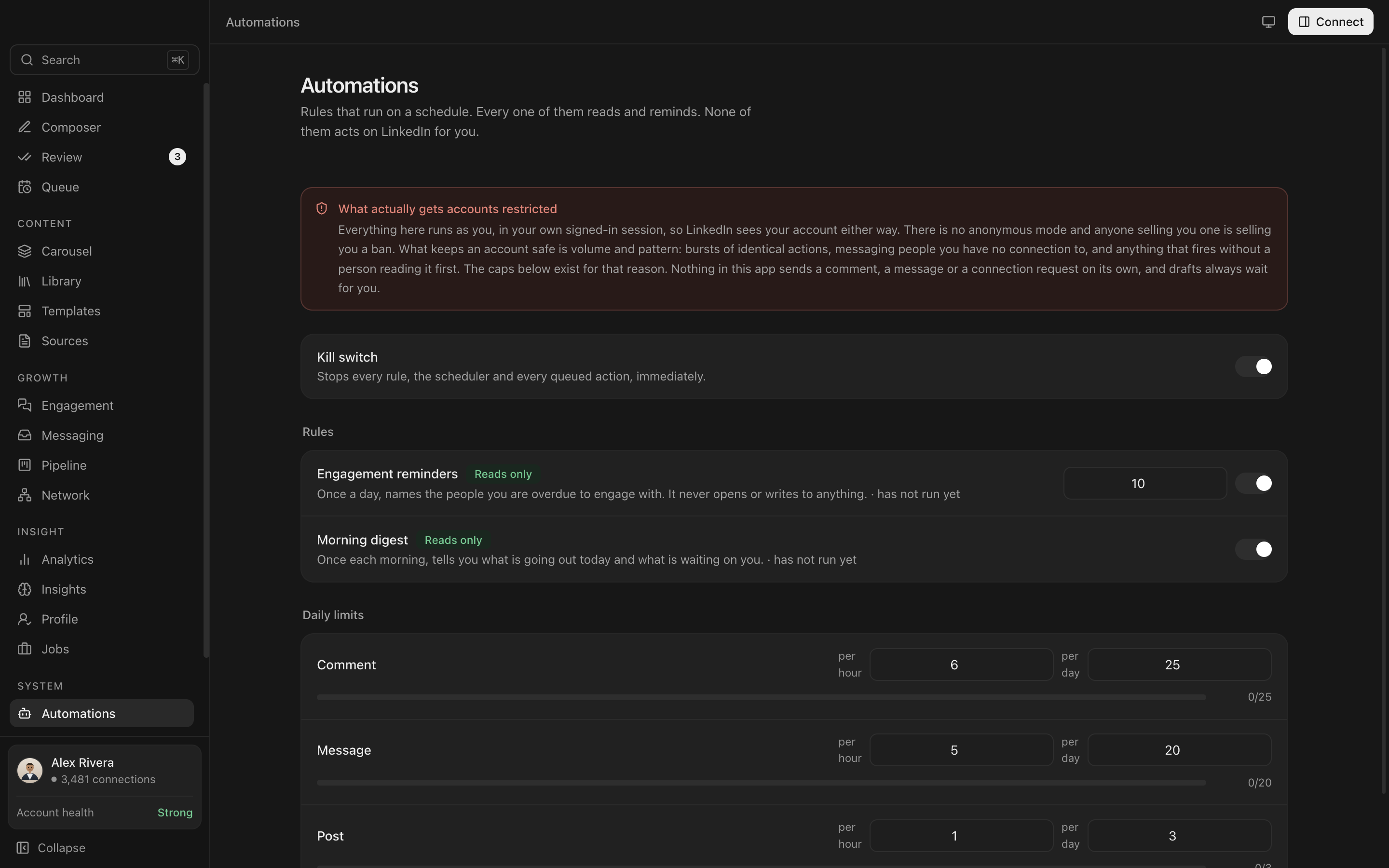
Said plainly, in the app itselfEverything here runs as you, in your own signed-in session, so LinkedIn sees your account either way. There is no anonymous mode, and anyone selling you one is selling you a ban.
Keys and secrets
If you bring your own Claude or OpenAI key, it is encrypted by your operating system's own credential store: Keychain on macOS, DPAPI on Windows. It is decrypted only inside the app's background process. The interface can ask whether a key exists. It cannot read what the key is, and it is refused if it tries.
If your operating system cannot encrypt the key, Everpost fails and tells you, rather than quietly writing the key to the database in plain text. That is a worse experience and a better outcome.
AI is off until you turn it on
Writing, scheduling, analytics, the pipeline CRM and the network graph never call a model. Everpost makes no AI request until you add a key or point it at a local model, and if you never do, it makes none at all.
When you do use AI, you have two options. Bring your own Claude or OpenAI key, in which case the request goes to that provider under your account, not through anything of ours. Or run a local model through Ollama, which is free, needs no key, and keeps the text on your machine. Either way, every suggestion lands in a review queue with a word-level diff, so nothing is rewritten without you seeing exactly what changed.
What Everpost never does
- Never asks for or stores your LinkedIn password
- Never posts, comments, connects or messages without you clicking the final button, unless you explicitly switch on automated connections or messaging, or connect LinkedIn's own posting API yourself, and even then only inside limits you set
- Never runs as a browser extension
- Never uploads your database. There is nowhere for it to go, because there is no Everpost server
- Never sells or shares your data, for the same reason
- Never shows a saved API key back to you in plain text
What this page does not claim
Everpost is in private beta and version 0.1.0. It has not had an external security audit, and there is no certification behind any of this. What there is: a small, local, single-user app with no server to breach, no shared database to leak, and a threat model that stops at your own machine.
Builds are not yet code signed, which means macOS and Windows both warn you on first open. That is covered on the download page, including exactly what the warning says and why.
Still deciding if a LinkedIn tool is safe to install?
Read what actually gets accounts restricted, and the four questions worth asking before you install anything.
What gets accounts restricted