
The quiet operating system for your LinkedIn.
Write, schedule, measure and follow up from one desktop app. Everything stays on your machine.
If you used Shield Analytics
Shield shut down. Your history should not have to.
Shield Analytics was the standard tool for personal LinkedIn analytics from 2018 until it wound down on 18 May 2026, after its Chrome extension became impossible to keep running against Google and LinkedIn. Its users lost their history along with it. Everpost keeps the same kind of history, but as a desktop app with no extension to pull and no server to shut down.
Write
A preview that matches the device it lands on.
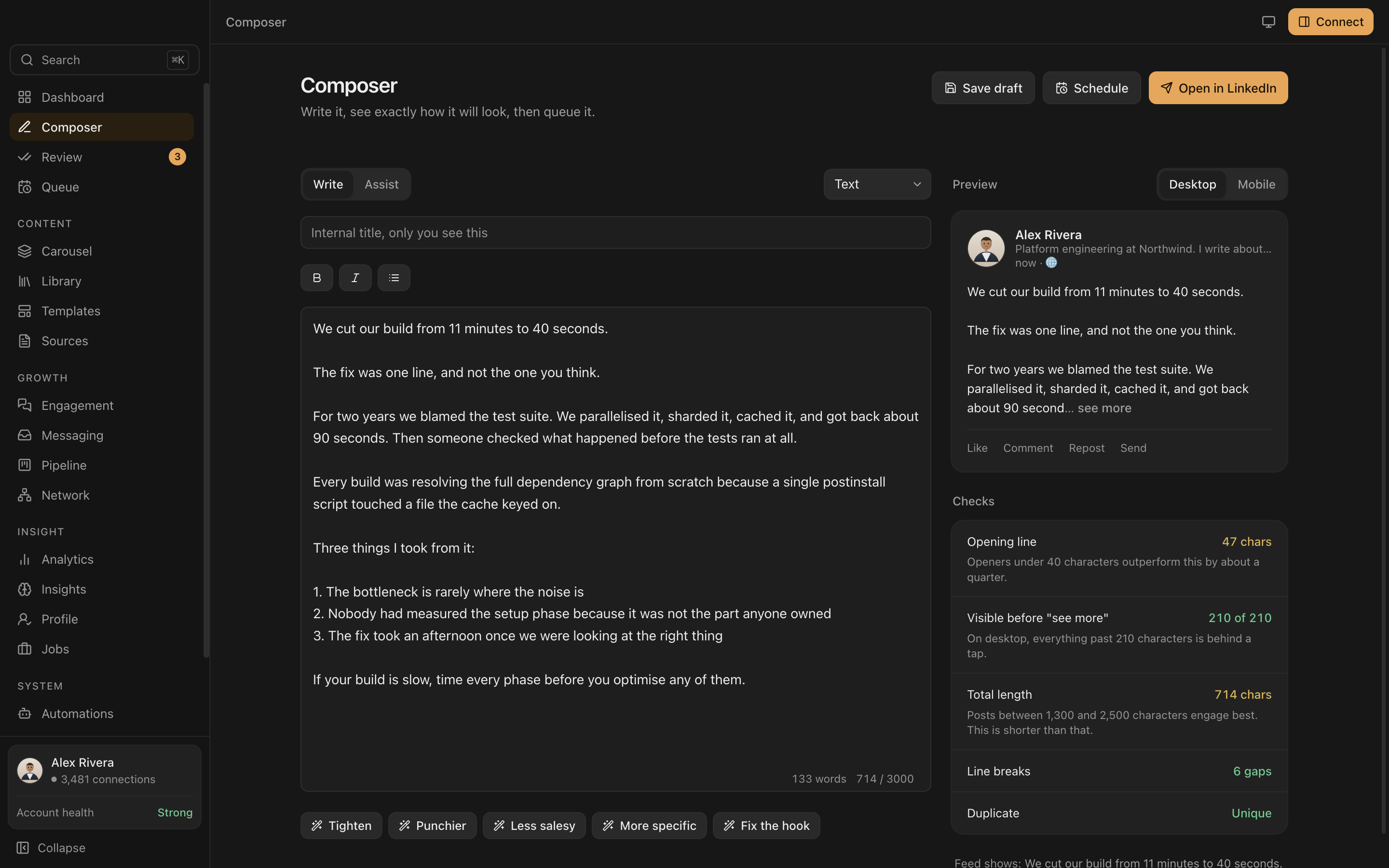
Most tools give you a text box. Everpost shows the post exactly as LinkedIn will render it, on desktop and on a phone, with checks that explain themselves instead of just scoring you.
- Desktop or mobile. The preview switches with one click, because the see more cut lands in a different place on each.
- Opening line, checked. Openers under 40 characters outperform longer ones by about a quarter, and Everpost counts yours as you type.
- One click rewrites. Tighten it, fix the hook or make it more specific, without leaving the draft.
- You press send. The Open in LinkedIn button hands your text to LinkedIn's own composer. Everpost never posts for you.
Measure
The history LinkedIn deletes, kept anyway.
LinkedIn's own analytics are a rolling window. Post performance drops off after about a year, and demographic detail goes after around 180 days. Everpost captures a snapshot every time you open it, so the numbers build into a permanent record instead of a shrinking one.
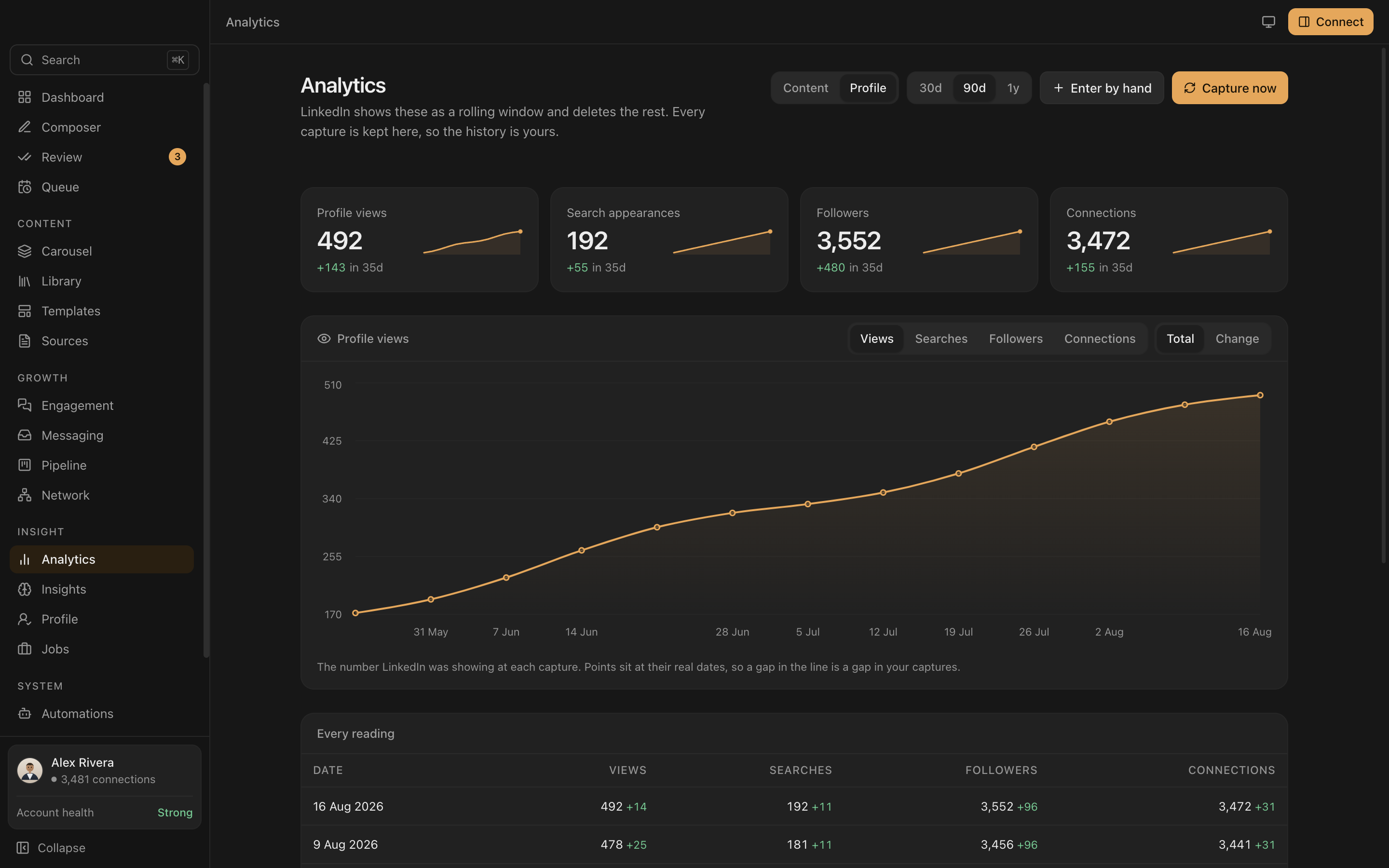
- Profile views, search appearances, followers and connections, tracked for as long as the app stays installed.
- Append only. Every capture adds a row instead of replacing the last one, so today sits next to every reading before it.
- 30 days, 90 days or a year, in one chart, once you have been capturing that long.
Findings
What your own numbers say, not generic advice.
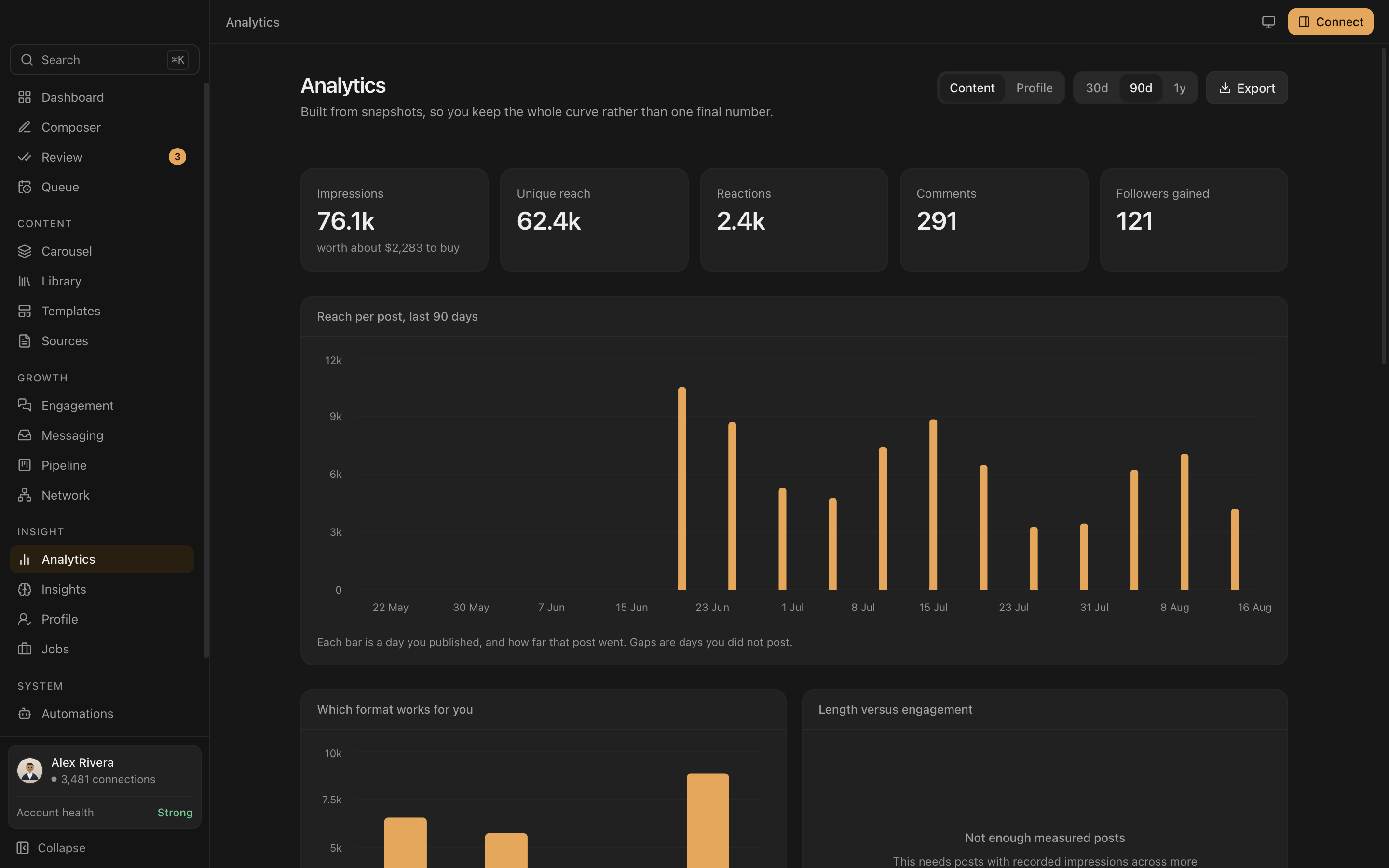
Every post you publish becomes a data point. Everpost turns your own history into answers about your account specifically, not a blog post's average.
- Which format works for you. Text, image, document and poll, compared on your own reach.
- Length versus engagement, in buckets from under 500 characters to past 2,200, so you know if a post is running long for no reason.
- Reach over time, so you can see which post produced a spike and copy what worked.
Carousels
The format that outperforms everything else, built slide by slide.
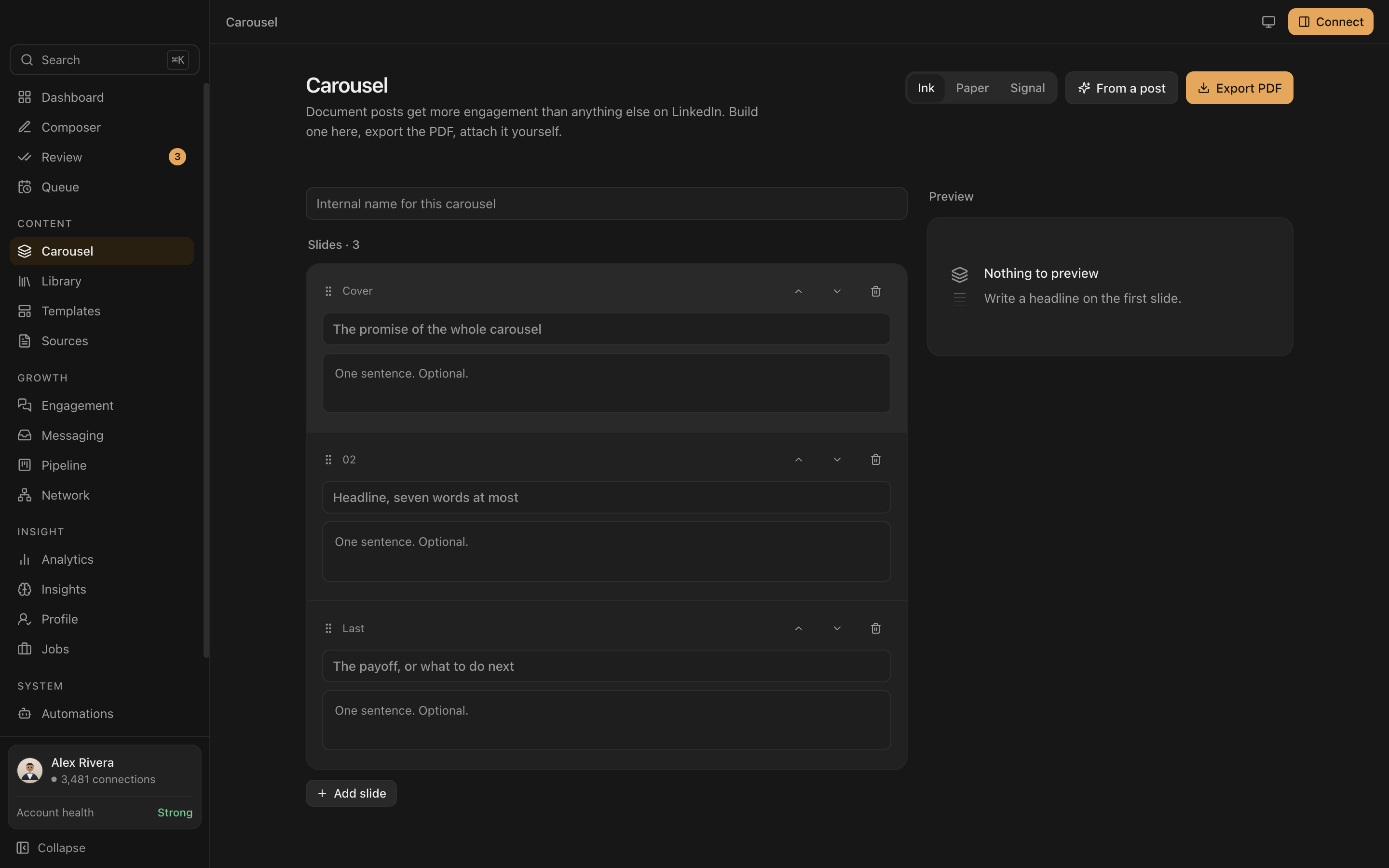
Document posts get more engagement than any other format on LinkedIn. Everpost's carousel builder gives every deck a cover, as many content slides as it needs, and a last slide built for the payoff, with a live preview as you write.
- Cover, content and a last slide. Each one asks for a headline of seven words or fewer, so the deck stays readable at thumbnail size.
- Start from a post you already wrote, or start blank.
- Export a PDF and attach it yourself. Everpost builds the file. It does not touch your LinkedIn account to post it.
Control
Nothing is posted, sent or connected without you.
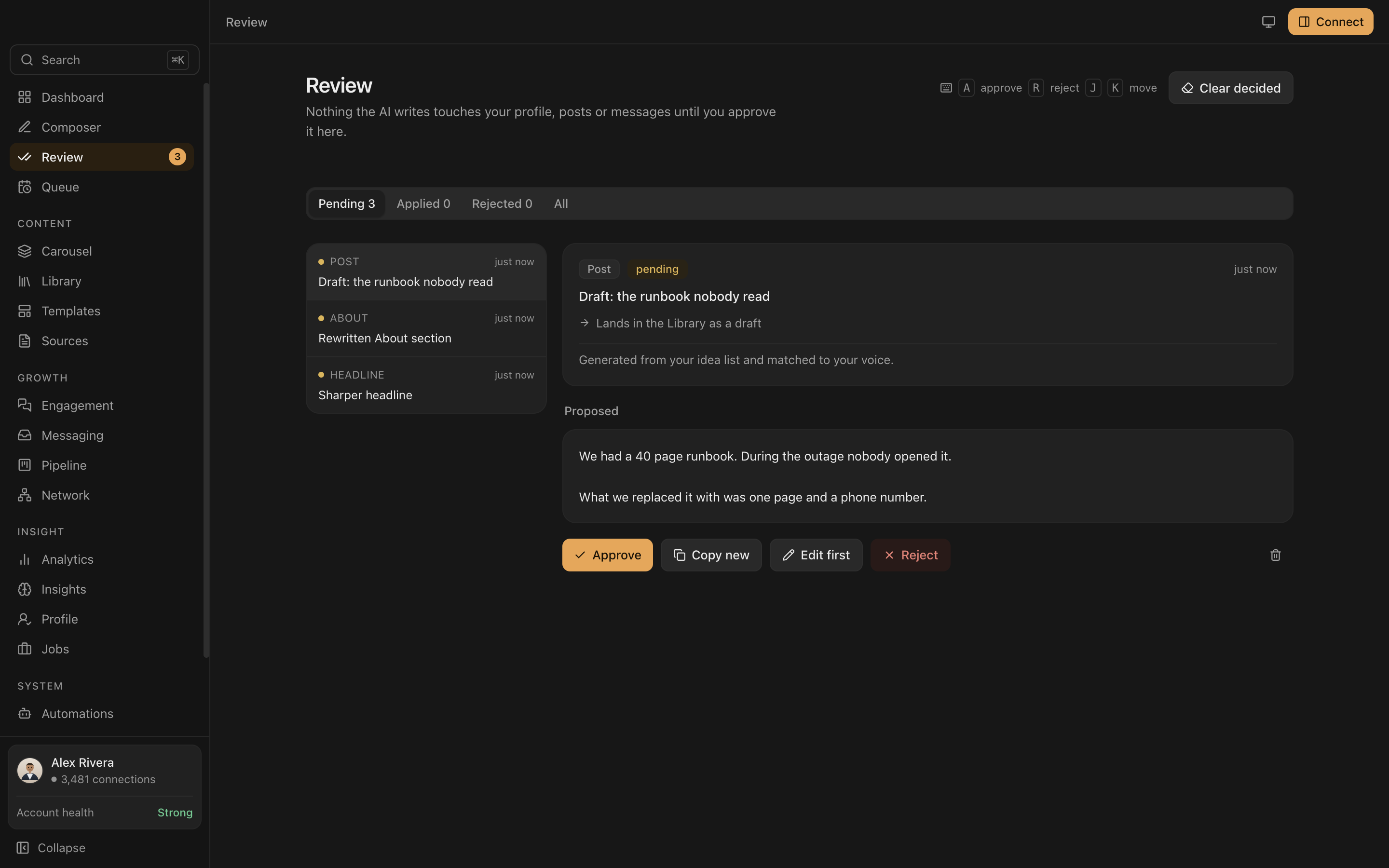
Everpost proposes. You decide. Every AI suggestion sits in a review queue with a word level diff until you approve it, edit it or reject it, and publishing always ends with you pressing post.
- Word level diffs, so you see exactly what changed, not just a before and after.
- Approve, edit first or reject, with keyboard shortcuts if you review a lot of suggestions.
- Connection requests and messages can be drafted, but sending is locked behind an explicit warning, because no compliant way to automate either one exists.
- Invitations are ranked, never answered. Everpost explains its reasoning and leaves accept or ignore to your click.
Grow
A pipeline built from the connections you already have.
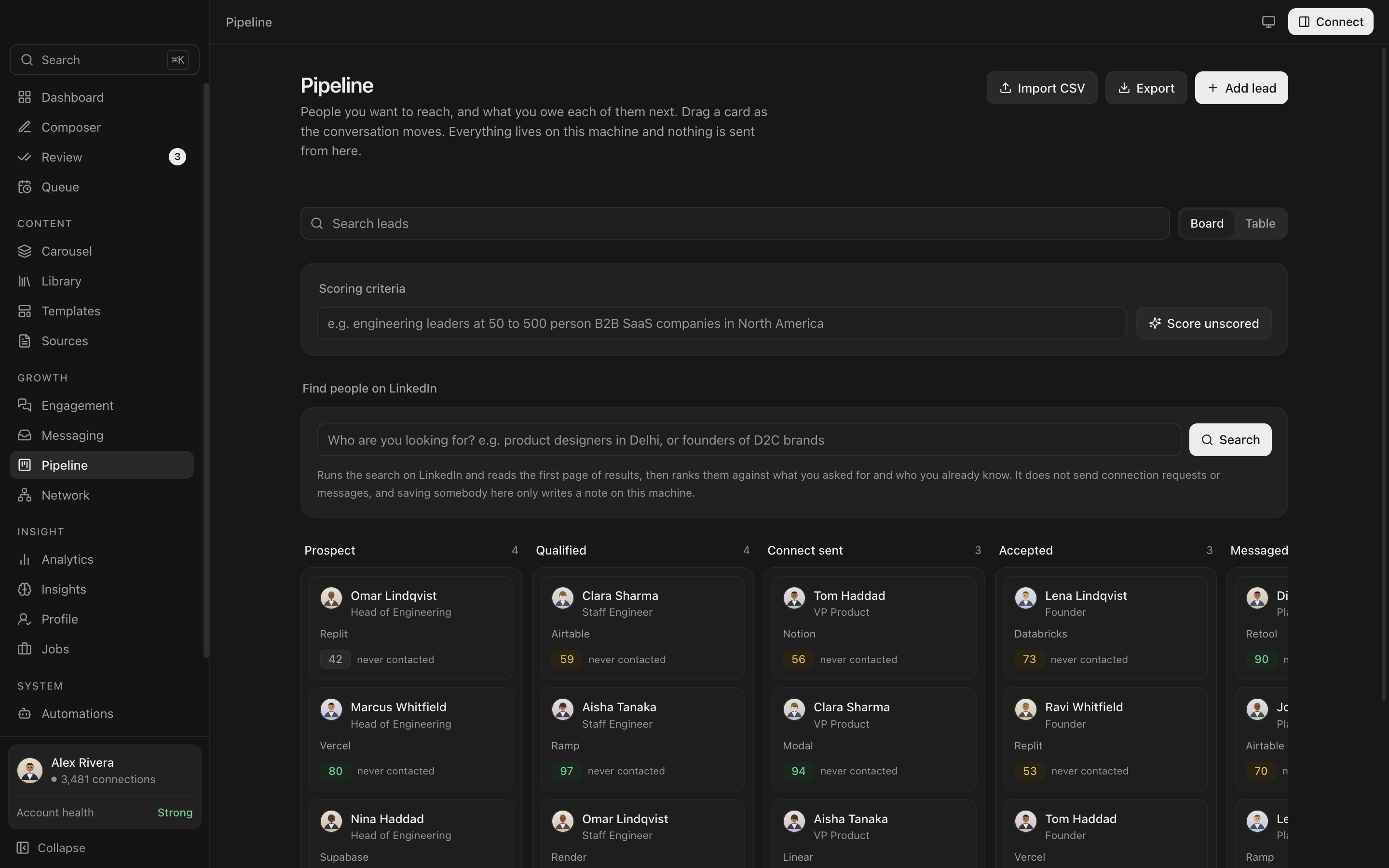
Import the connection list LinkedIn already gives you, then work it like a pipeline. Everpost can score and rank people against criteria you set, but it only ever writes notes on your own machine.
- Drag through stages, from prospect to meeting booked, same as any sales pipeline.
- Score unscored leads against criteria you write in plain English.
- Search LinkedIn for people who match, ranked against who you already know. Nothing is sent as part of the search.
- Save anyone as a lead straight from the LinkedIn panel inside the app.
Side by side
LinkedIn, inside the app.
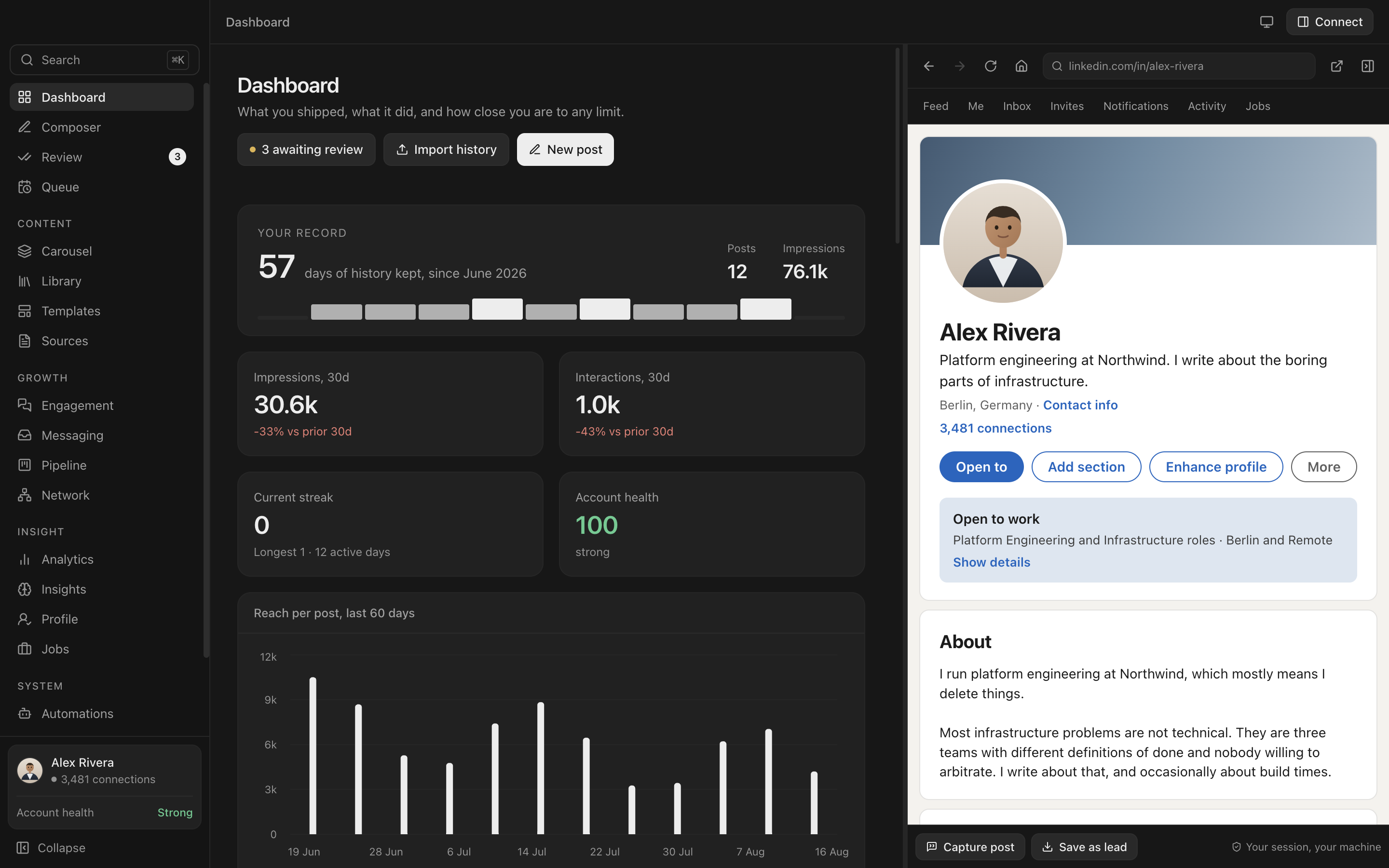
Read a profile or a post on the right and write about it on the left. It is a real signed in session on your own machine, not a scrape and not a preview.
- One window. No alt tab between a tool and the site it is about.
- Your session, your machine. You sign in yourself, in a normal browser view.
- Read a post, draft the comment. The text you are replying to stays on screen while you write.
- Resizable. Drag the divider, or close the panel and get the full width back.
Start faster
Give it your CV, not an evening.
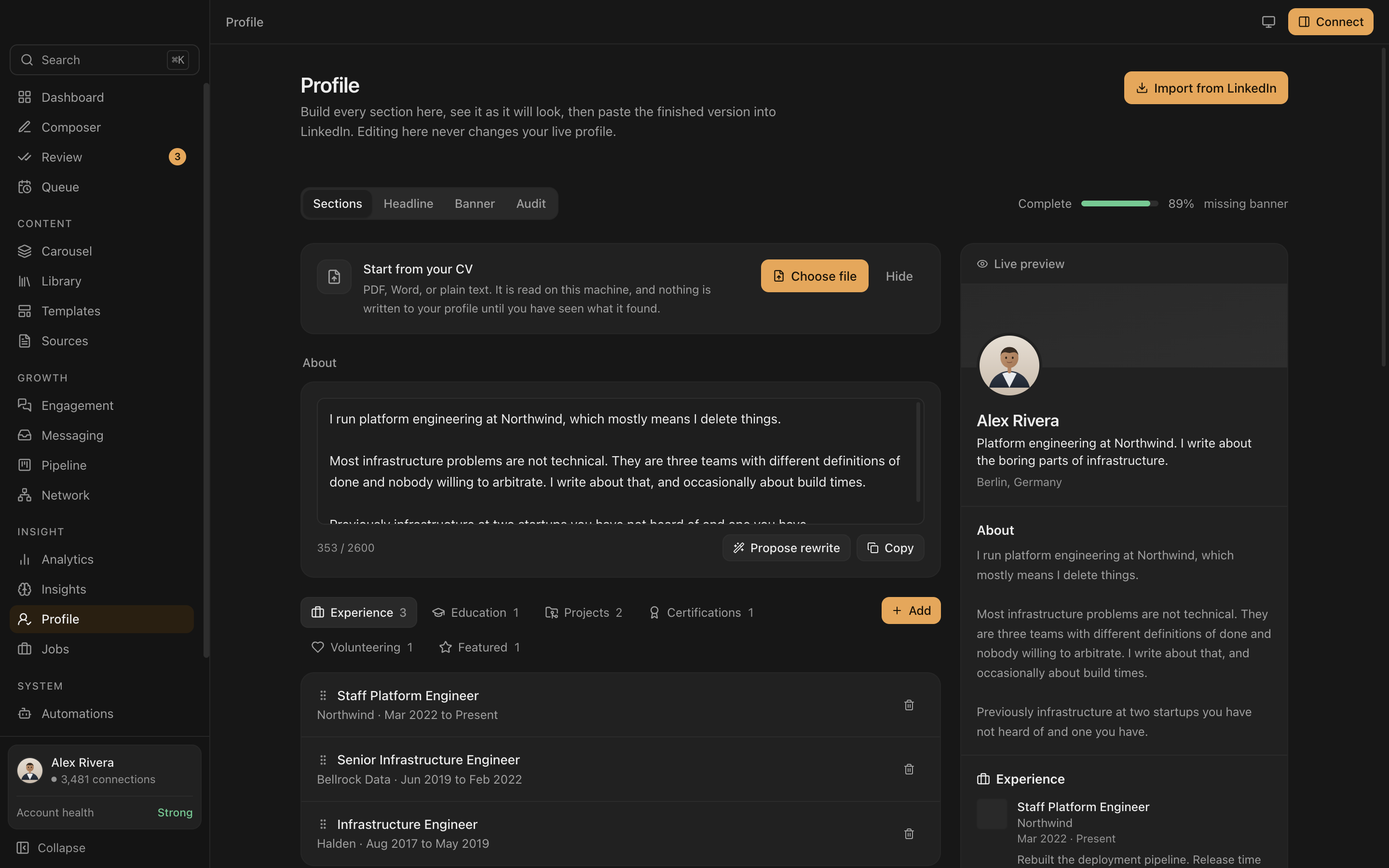
Upload a PDF, a Word file or plain text. It is read on this machine, and nothing is written to your profile until you have seen what it found.
- Every section in one place. Headline, About, banner and experience, built here and pasted into LinkedIn yourself.
- Editing here never changes your live profile, so there is nothing to undo if you change your mind.
- A rewrite is proposed, not applied. You still choose approve, edit first or reject.
- An audit shows exactly what is missing, headline, banner or a section, so completeness is a number instead of a guess.
Everything else
Seventeen screens, one app.
No tab sprawl, no second subscription, no browser extension asking for permissions.
Profile builder, live preview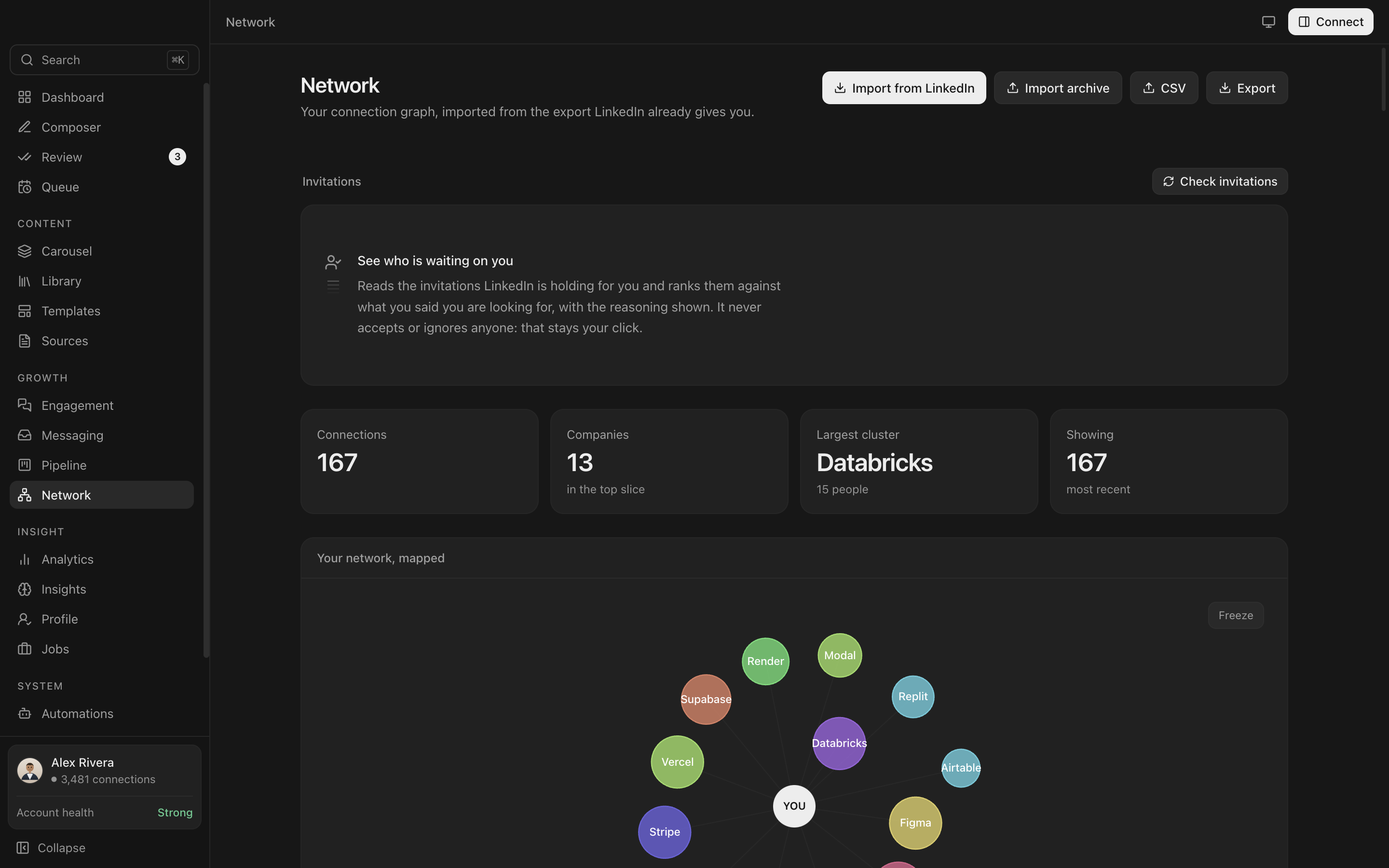 Network graph by company
 Threads and sequences
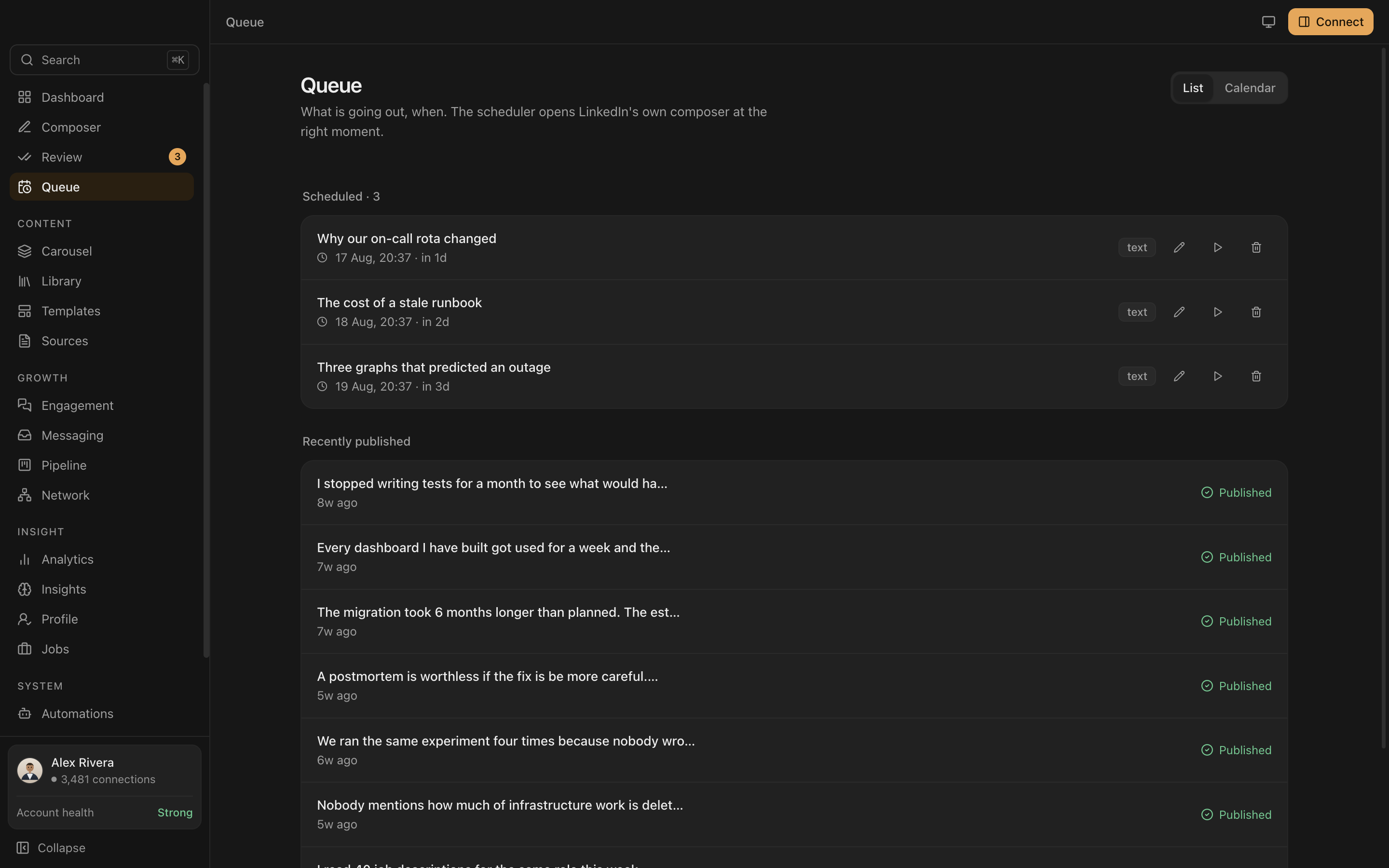 Queue and scheduling
 Job match and cover letters
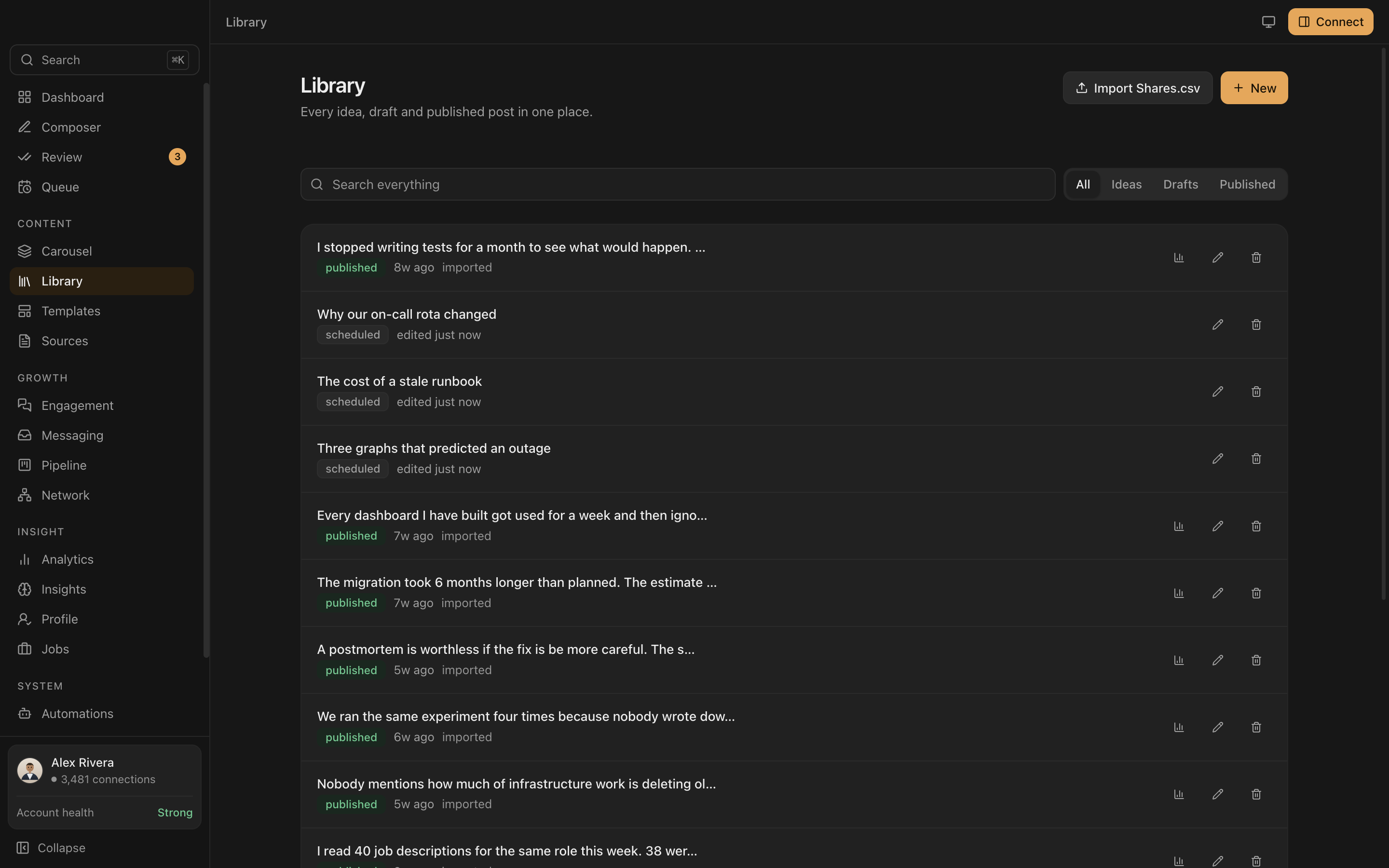 Searchable post library
 Indigo, on the dashboard
 Jade, on analytics
 Amber, on the pipeline
 Rose, on the network
Four accents, light and dark, remembered between sessions. Monochrome is the default.
Privacy
Your data never leaves your machine.
One SQLite file on your own disk. The only network calls Everpost makes are the AI requests you trigger.
Your session, your machine
LinkedIn runs in a real browser window on your machine. You sign in yourself. The app never copies, stores or transmits your cookies.
Keys in the keychain
API keys are encrypted by the operating system and only ever decrypted in the background process. The interface can ask whether a key exists, never what it is.
You press post
Publishing opens LinkedIn's own composer with your text loaded. Nothing is sent on your behalf without you.
AI, optional
Works fine with no AI at all.
Writing, scheduling, analytics, the CRM and the graph never touch a model. The AI features are additive, and you choose who runs them.
Free and local
Point Everpost at Ollama and everything runs on your own machine. No key, no account, no per-token cost.
Your own key
Claude or OpenAI, whichever you already pay for. Everpost finds a key already on your machine and offers to adopt it.
Or none
Every AI button is clearly marked. Skip them and the rest of the app is unchanged.
Pricing
Five days free. Then twelve dollars.
No card to start. When a trial or licence ends you keep every post, lead and snapshot, still readable and still exportable. Only the publishing and the AI pause.
Everything, billed month to month. Cancel whenever.
- Composer with the real feed preview
- Scheduling, queue and publishing
- Unlimited analytics history
- AI with your own key, or free with Ollama
- Pipeline, network graph, messaging
Three months free, and eleven fewer chances for a card to fail.
- Everything in Monthly
- Three months free
- One payment a year
Pays for the build. Closes at 100 and never reopens.
- Everything, forever
- Every future desktop update
- Three device activations
- Covers the desktop app, not a future hosted service
Questions
Before you install it.
Will Everpost get my LinkedIn account restricted?
Everpost does not do the things LinkedIn restricts accounts for. It runs no Chrome extension, replays no requests, and crawls nothing in the background. LinkedIn opens in a real browser window on your own machine, on your own session and your own IP, and you sign in yourself. Publishing opens LinkedIn's own composer with your text already loaded, and you press post. Automated connection requests and messaging exist but are locked behind an explicit warning, because no compliant path for them exists.
Is Everpost a Chrome extension?
No. Everpost is a desktop application for macOS and Windows. This matters more than it used to: Shield Analytics wound down in May 2026 after its extension was pulled from the Chrome Web Store, and browser extensions that touch LinkedIn pages create detectable signatures. A desktop app that drives a normal browser session has neither problem.
How far back does LinkedIn analytics go?
LinkedIn's own dashboards show a rolling window, generally capped at 365 days for pages and shorter for personal profiles, and exports are capped the same way. Anything older is simply not retrievable. Everpost writes an append-only snapshot every time it reads your numbers, so the history accumulates on your disk from the day you install it. It cannot recover figures from before that.
Where does Everpost store my data?
In one SQLite file on your own disk. On macOS that is ~/Library/Application Support/Everpost/data, and on Windows %APPDATA%\Everpost\data. There is no Everpost server and no account to create. API keys are encrypted by the operating system keychain, Keychain on macOS and DPAPI on Windows, and are only ever decrypted inside the background process.
Do I need to pay for AI to use Everpost?
No. Writing, scheduling, analytics, the CRM and the network graph never call a model. If you do want AI, you can point Everpost at Ollama and run everything locally for free, or bring your own Claude or OpenAI key. Everpost can detect a key already on your machine and offer to adopt it, but never uses one without an explicit click.
Does Everpost post to LinkedIn automatically?
No. Scheduling decides when a post surfaces, not who sends it. At the scheduled moment Everpost opens LinkedIn's own composer with your text loaded and you press post. That is a deliberate trade: it costs you one click and it keeps the account safe.
Is Everpost a good replacement for Shield Analytics?
It covers the same core job, which is keeping a long post and profile history that LinkedIn itself discards, and it adds writing, scheduling and a CRM. The important difference is architectural. Shield was a cloud service with a browser extension, which is what ended it. Everpost keeps the database on your machine, so there is no vendor whose shutdown can take your history with it. Export your Shield data before the portal closes, because Everpost can only record from the day you install it.
Is there a free version of Everpost?
Yes. The free tier has no card and no account, and includes the composer with the real feed preview, hook, length and duplicate checks, the pipeline CRM, the network graph, 30 days of analytics and local AI through Ollama. Pro is 12 USD a month or 99 USD a year and mainly buys unlimited analytics history. Nothing is taken away if a licence lapses: every post, lead and snapshot stays, the charts just stop past 30 days.
Access
Private beta.
Builds go out in small batches so problems get found before they scale. Leave an email and you will get one.